
主题
Axis 坐标轴
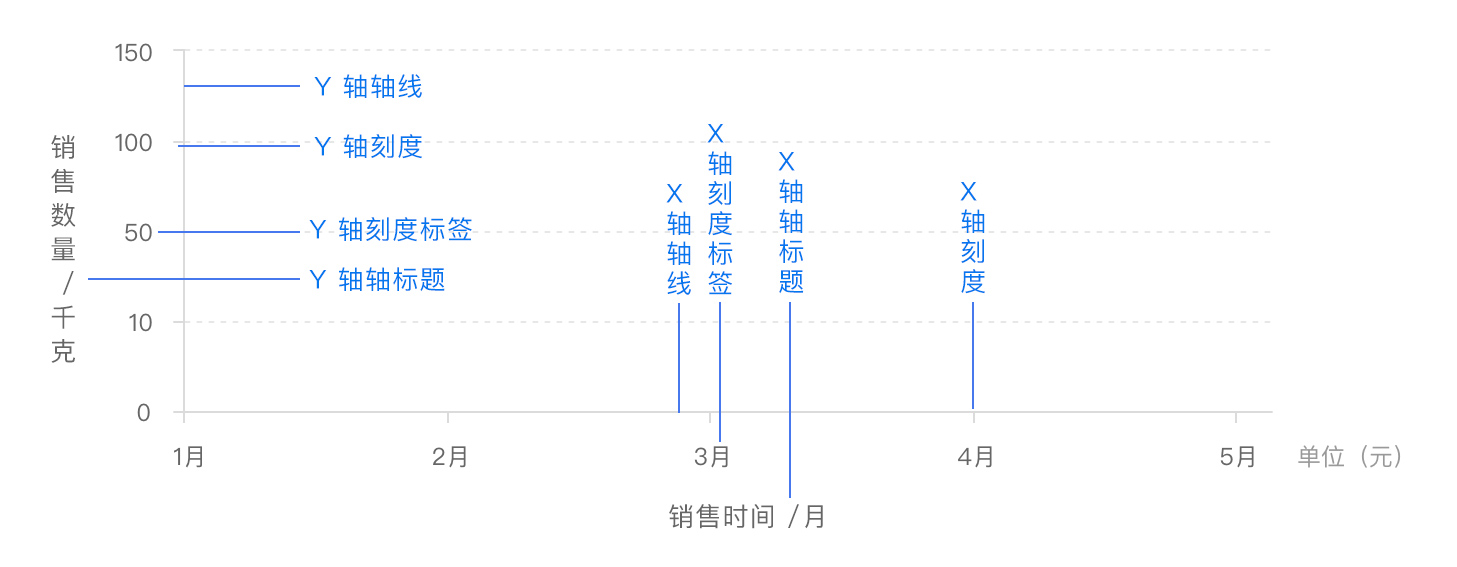
x 轴和 y 轴都由 4 个部分组成:
- 轴线
- 刻度
- 刻度标签
- 轴标题
基本属性
js
const option = {
  xAxis: {
    type: 'value',
    min: 0, // 最小值
    max: 10, // 最大值
    interval: 2, // 间隔

    // 轴标题
    name: 'X轴',
    nameTextStyle: {
      color: 'red',
    },
    // 轴线
    axisLine: {
      lineStyle: {
        color: 'red',
      },
    },
    // 轴标签
    axisLabel: {
      show: true,
      color: 'red',
    },
    // 轴刻度
    axisTick: {
      show: true,
      lineStyle: {
        color: 'red',
        width: 2,
      },
    },
    // 分割线
    splitLine: {
      show: true,
      lineStyle: {
        color: 'red',
        type: 'dashed',
      },
    },
  },
  yAxis: {
    type: 'value',
    min: 0,
    max: 10,
    interval: 2,

    // 轴标题
    name: 'Y轴',
    nameTextStyle: {
      color: 'blue',
    },
    // 轴线
    axisLine: {
      show: true,
      lineStyle: {
        color: 'blue',
      },
    },
    // 轴标签
    axisLabel: {
      show: true,
      color: 'blue',
    },
    // 轴刻度
    axisTick: {
      show: true,
      lineStyle: {
        color: 'blue',
        width: 2,
      },
    },
    // 分割线
    splitLine: {
      show: true,
      lineStyle: {
        color: 'blue',
        type: 'dashed',
      },
    },
  },
}
调整轴标题的位置
js
const option = {
  xAxis: {
    name: 'X轴',
    nameLocation: 'middle', // 名称位置:middle-中间, start-开始, end-结束
    nameGap: 0, // 名称与轴线的距离
    nameRotate: 0, // 旋转角度
    nameTextStyle: {
      color: 'red',
      fontSize: 24,
      lineHeight: 24,
    },
  },
  yAxis: {
    // 轴标题
    name: 'Y\n轴', // 用换行符实现垂直排列
    nameLocation: 'middle', // 名称位置:middle-中间, start-开始, end-结束
    nameGap: 0, // 名称与轴线的距离
    nameRotate: 0, // 旋转角度
    nameTextStyle: {
      color: 'blue', // 颜色
      align: 'center', // 对齐方式
      fontSize: 24, // 字体大小
      lineHeight: 24, // 行高
    },
  },
}
边界间隙
js
const option = {
  xAxis: {
    type: 'value',
    boundaryGap: false, // 折线图从坐标轴起点开始,不留空白
  },
  // ... 其他配置
}